
In order for the messages created with the IBI-aws Admin to reach the IBI-aws Clients, a central location is required for the exchange of the data. For the exchange a file (message file) is used.
The message file needed for data exchange can be provided in the ways described below.
File Share
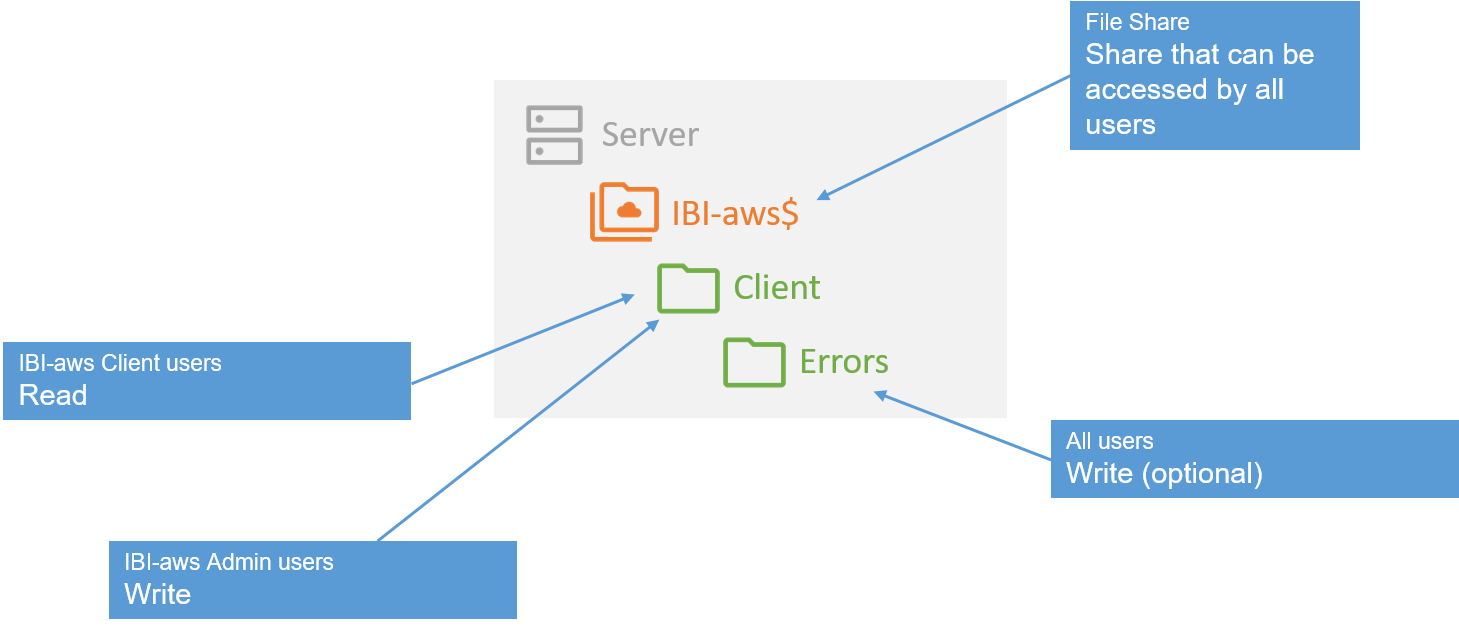
If you decide to use a file share as a central storage location for the message file, you will need a directory (e.g. client), which will later serve as a publishing location for the IBI-aws Admin and as a source of information for published IBI-aws messages for the IBI-aws Clients.
The following permissions have to be assigned:
|
Directory |
Permission |
Description |
|---|---|---|
|
Client |
Read |
Assigned for all users who are to receive IBI-aws messages |
|
Client |
Write |
Assigned for all IBI-aws Admin users to be able to publish messages |
|
Client/Errors |
Write |
(Optional) If you want to log problems that occur in the IBI-aws Client, all users that get IBI-aws messages need write permission in this directory |
Webserver
-
The webserver must be able to handle the expected number of IBI-aws MobileClient users
-
It must be expected that many IBI-aws Client users will access the webserver within a short time after a publication
-
-
IBI-aws Clients must be able to read the message file via HTTP/S GET
-
IBI-aws Clients must be able to read the message file via HTTP/S HEAD
-
The IBI-aws Admin must be able to write the message file via WebDAV, FTP or file path on the webserver
-
The webserver must provide a trustworthy certificate when using HTTPS
-
The following MIME type might have to be added
-
File name extension: .ibi
-
MIME type: text/xml
-